Online Twitter Video Downloader
Find available MP4 video from a public X (Twitter) post. No account password or app installation required.
How to save a video from X
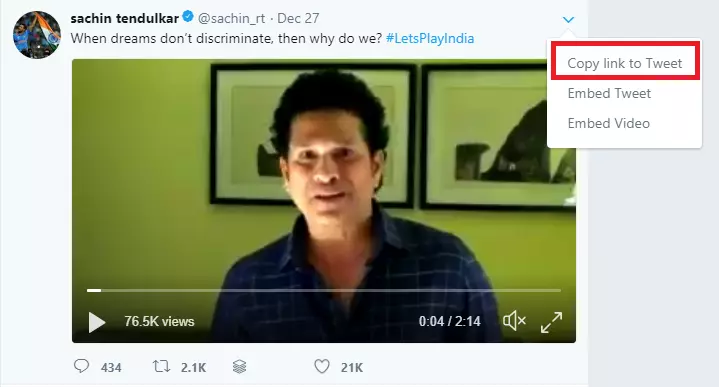
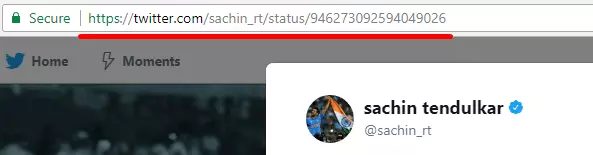
- Open the original post and choose Share → Copy link.
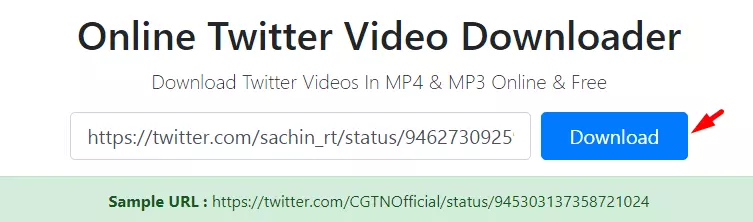
- Paste the full post link above and select Find video.
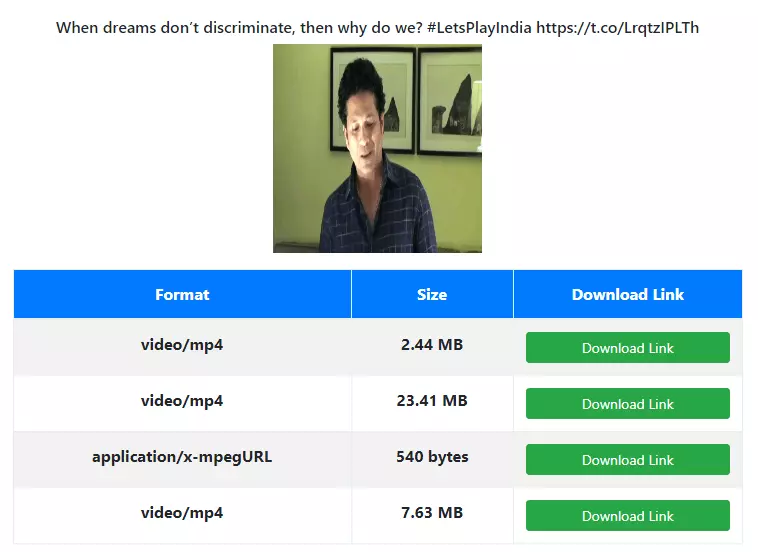
- Open an available MP4 option. Use Save video as on desktop or your device’s share and save controls.
Convert to GIF
After the video is found, you can turn a clip into a real .gif file. Choose the start, a length of up to 15 seconds and a width of 320, 480 or 640 px, then press “Convert to GIF”. GIF files are much larger than the MP4 of the same clip. More details are on the Twitter GIF downloader page.
Extract MP3 audio
Once the video is found, press “Extract MP3” to save its sound as an MP3 at 128 kbps. This only works for videos that have an audio track; GIF posts have none. See the Twitter to MP3 converter for the steps.
Processing happens in your browser
Our server only looks up which public video addresses X provides for the post. Your browser downloads the file directly from X’s video server, and GIF and MP3 conversion run on your device, so converted files are not uploaded to GetMyTweet.
The current X download option
Before using another tool, check the video menu in X. Eligible Premium users can download videos when the creator allows it. X describes this option for videos uploaded from July 25, 2023. A creator can disable downloads, and availability varies by post and account.
Reference: X Help: videos. Checked October 21, 2026.
Video, GIF and audio are different formats
An animated GIF on X is often delivered as an MP4 video. An MP4 link is not a GIF file or an MP3 audio file. The video list shows only the MP4 files X actually returns. GIF and MP3 files are made by converting that MP4 in your browser with the buttons below the list.
Frequently asked questions
Why is a video unavailable?
The post may be private, deleted, restricted, or not contain video. X’s public embed service can also change or refuse a request. Try the original X app and check the creator’s download settings.
Can I save a private account’s videos?
No. This service does not log in to X, accept account passwords, or retrieve private posts.
Can I reuse the saved video?
Public visibility does not grant permission to republish. Obtain permission from the rights holder and respect the creator’s choices.
Original GetMyTweet instructions
Historical screenshots preserved from the December 2025 archive. The current X interface may look different.
Updated guides
Browse the X video, mobile saving and troubleshooting guides.